Your data
Do I need an account to use AIMONX?
No. There's nothing to sign up for and no login. Download AIMONX and start logging.
Where is my AIMONX data stored?
On your iPhone, encrypted. AIMONX also keeps an encrypted copy in your own iCloud, so your log survives a lost or broken phone. There are no AIMONX servers, and we can't see your data.
See how AIMONX protects your data
Does AIMONX collect or sell my data?
No. Your data never reaches us: there are no AIMONX servers, no ad tracking, and nothing to sell. You can even use AIMONX without ever entering a serial number.
Can I export my data from AIMONX?
Yes. On Free, you can create PDF reports: a record for each firearm and an inventory of all of them, with photos and serial numbers if you want them. With Pro, you can also create an encrypted archive of your whole log, keep it wherever you like, and import it back anytime.
How do I delete all my AIMONX data?
In AIMONX Settings, tap Reset App. It deletes all your data on the iPhone, along with the key that unlocks it, so the AIMONX copy in iCloud can't be used anymore either. AIMONX starts over like a new install. This can't be undone.
Moving to a new iPhone
How do I move AIMONX to a new iPhone?
Sign in to your new iPhone with the same Apple Account, then install AIMONX and open it. Your firearms, sessions and ammo come back on their own. That's the AIMONX iCloud copy at work: it's on by default, and there's nothing to set up.
One thing to check: AIMONX brings over the key that unlocks your log through iCloud Passwords & Keychain, the same feature that keeps your saved passwords in sync. On your new iPhone, go to Settings > [your name] > iCloud > Passwords and make sure Sync this iPhone is on.
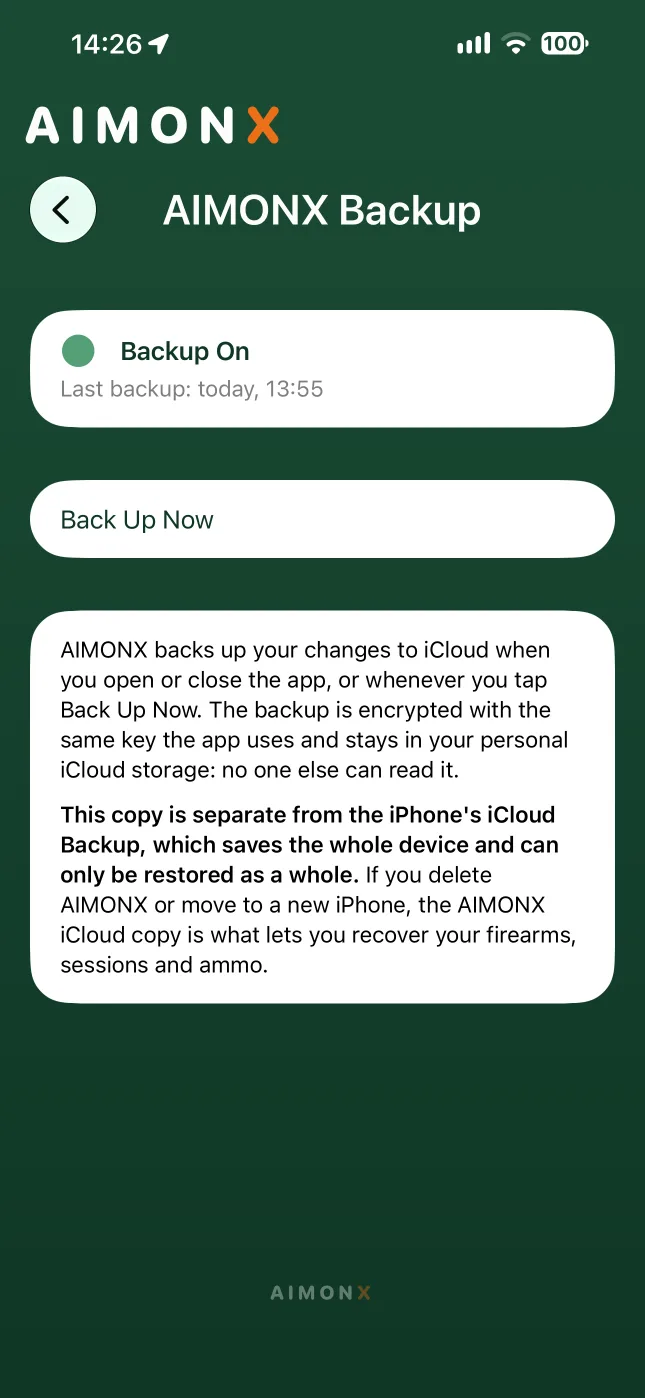
Before you switch, open AIMONX Backup on your old iPhone and tap Back Up Now, so the copy has your latest changes.
How do I move AIMONX to a new iPhone with Advanced Protection on?
Same Apple Account, and Sync this iPhone on under Settings > [your name] > iCloud > Passwords. Then install AIMONX and open it. AIMONX asks for your Advanced Protection password. Enter it, and your log is back.
My AIMONX data didn't come back on my new iPhone. What now?
First, check that Sync this iPhone is on under Settings > [your name] > iCloud > Passwords: that's how the key that unlocks your log gets to your new iPhone, and it can take a few minutes to arrive. Then fully close AIMONX and open it again.
Doesn't my iPhone's iCloud Backup already cover AIMONX?
Don't count on it. The iPhone's iCloud Backup saves the whole device and can only be restored as a whole. The AIMONX iCloud copy is separate: it's what brings your log back if you delete the app or move to a new iPhone.
What if I don't use iCloud?
Then AIMONX has nowhere to keep a copy off your iPhone. There are no AIMONX servers, so if you lose the iPhone, your log goes with it. With Pro, you can create an encrypted archive and keep it wherever you like, such as a drive or another cloud service, then import it on your new iPhone. Importing works on Free too. Keep in mind that importing replaces everything on that iPhone.
Passwords
I forgot my AIMONX password. Can you reset it?
No. No one can, not even us, and that's the point. By default, AIMONX doesn't use a password at all: it opens with Face ID, Touch ID or your passcode. A password only exists if you turned on Advanced Protection, a Pro feature that locks the key to your log with a password only you know.
You can try as many times as you like. There's no lockout. If you can't remember it, the only way forward is Reset App, which deletes your log and starts AIMONX over from scratch.
See how Advanced Protection works
What if I forget an AIMONX archive's password?
Each archive has its own password, chosen when you create it. Forget it and that archive can't be opened by anyone. The log on your iPhone isn't affected.
When Pro ends
What happens to my data if my AIMONX Pro subscription ends?
Nothing gets lost. Everything beyond the Free limits stays readable, just frozen, until you come back.
- Of your active firearms, the one you added first stays fully usable. The others turn read-only: you can open them and see their history, rounds, costs and maintenance, but you can't edit them or log new sessions with them.
- The same goes for anything else past the Free limits: extra maintenance rules, any renewals past the first two, and handloads.
- You can still sell, deactivate or delete any firearm.
- Your iCloud copy keeps running, and you can still import an archive.
Resubscribe and everything unlocks right away.
What happens to Advanced Protection when Pro ends?
It switches back to the standard setup, but only the next time you open AIMONX and enter your password, and the app tells you when it happens. Your data stays encrypted. The only change is that the key is once again kept by your Apple Account. Resubscribe whenever you want to set a password again.
Free and Pro
Is AIMONX free?
Yes. AIMONX is free to download, and Free is a real logbook, not a trial. Pro is an optional subscription: $1.99 a month or $14.99 a year. Prices vary by country: the App Store shows yours. Family Sharing is included, so your family gets Pro too.
What's included in AIMONX Free?
One active firearm, unlimited range sessions, factory ammo with inventory, a cleaning rule by round count for each firearm, two renewals, all your statistics, PDF reports, up to five photos per firearm, and your encrypted iCloud copy.
What does AIMONX Pro add?
Unlimited firearms, handloads, unlimited maintenance rules of every type with an early heads-up, unlimited renewals, matches and match stats, encrypted archives to export, and Advanced Protection.